
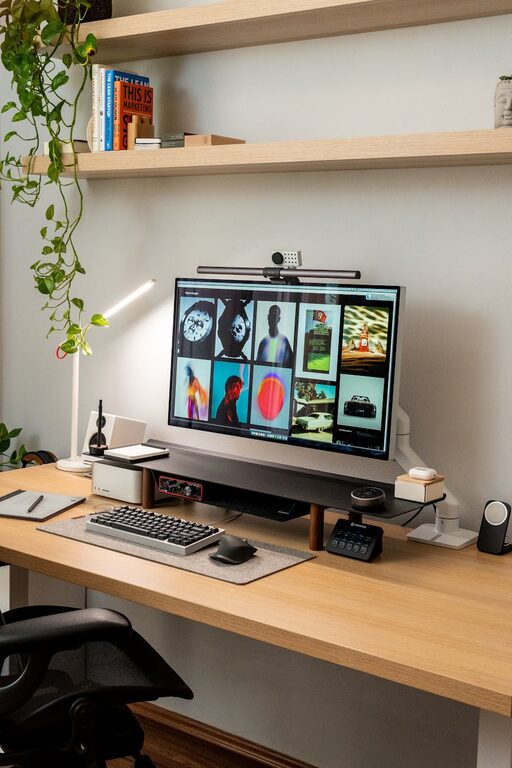
Creating a dedicated home workspace has become essential for many people working remotely or balancing multiple responsibilities at home. An effective workspace can help you stay focused, reduce distractions, and make your workday more comfortable and productive. Whether you have a small corner or a full room to dedicate to your work, these tips will guide you in designing a space that suits your needs and promotes productivity.
Choose the Right Location
Start by selecting a spot in your home that is quiet and receives minimal foot traffic. Ideally, your workspace should be separate from areas where you typically relax or spend time with family. A room with a door is a bonus since it helps create a clear physical and mental boundary between work and home life.
Prioritize Natural Light
Good lighting is crucial for productivity and eye comfort. Position your desk near a window to take advantage of natural light, which can improve mood and energy levels. When natural light isn’t available or during darker hours, invest in quality task lighting such as adjustable desk lamps that reduce glare and shadows.
Invest in Ergonomic Furniture
Comfort plays a significant role in productivity. Choose a chair that supports your back and encourages good posture. Your desk should be at a height that allows your elbows to rest at around 90 degrees when typing. Consider adjustable furniture options so you can alternate between sitting and standing throughout the day, which is great for your health.
Keep Your Workspace Organized
A clutter-free environment reduces distractions and helps you focus. Use organizers such as trays, shelves, and bins to store supplies and paperwork. Take a few minutes at the end of each workday to tidy up your workspace. Dedicated spots for frequently used items ensure you can quickly find what you need.
Minimize Distractions
Work from home often comes with extra distractions like household noise or family members. Consider noise-canceling headphones if you’re in a noisy environment. Communicate your work schedule clearly to others in your household to minimize interruptions. You may also want to limit phone usage or social media during work hours by using apps that block or restrict distracting websites.
Personalize Your Space Thoughtfully
A workspace should feel inviting but not cluttered. Add personal touches like a plant, artwork, or photos that inspire you, but avoid overdecorating. Personalization can boost your mood and creativity but keep it minimal to maintain a professional feel.
Use Technology Wisely
Ensure your internet connection is strong and reliable to avoid disruptions during virtual meetings or while accessing online resources. Invest in good quality equipment such as a keyboard, mouse, and monitor that suit your workflow. Keep your software updated and use productivity tools like calendars and task managers to stay organized.
Incorporate Movement Breaks and Refresh Zones
A productive workspace is not just about where you sit but also about how you take breaks. Set up a nearby area where you can stretch or take a short walk to refresh your mind. Movement helps reduce fatigue and improves focus when you return to work tasks.
Set Boundaries and a Routine
Establish clear boundaries around your workspace and your work hours. Start your workday at a regular time, take planned breaks, and shut down your workspace at the end of the day. This routine helps create a separation between work and personal life, which is important for mental balance.
Final Thoughts
Creating an effective home workspace involves careful planning and attention to both comfort and function. By choosing the right location, organizing efficiently, and setting clear boundaries, you can create an environment that supports your best work. Keep in mind that your needs may evolve, so regularly assess and adjust your workspace to stay productive and comfortable.
With these tips, your home workspace can become a place where you not only get work done, but also feel motivated and comfortable every day.